
The Busy Sequence - Handling of Long-Running change and do Requests#
Note
This tutorial focuses on a single concept that trips up most newcomers to the protocol: the busy sequence that takes place when an ECS (Experiment Control System) asks a SEC node to change something, and that change cannot be completed instantly.
Introduction#
SECoP is a line-based, request/reply protocol used to connect sample environment equipment (cryostats, magnets, pressure cells, motors, …) to the control software of an experiment. Every message is a line of text built from three parts:
<action> <specifier> <data>
For example, change temperature:target 295 is a request whose action is
change, whose specifier is temperature:target (the parameter target of
module temperature), and whose data is the JSON value 295.
Reading a value or sending a simple command is straightforward: the ECS asks, the SEC node answers, done. But many real instruments cannot “just do” what is asked of them in zero time. Setting a temperature controller’s target to 295 K does not mean the sample is suddenly at 295 K – it means the controller now needs to ramp there, which may take minutes. SECoP needs a well-defined way to say “I have accepted your request and started working on it, but I am not finished yet.” That well-defined way is what this tutorial calls the busy sequence.
Why is a busy sequence needed at all?#
Imagine a magnet module magnetic_field with a target parameter. A naive
protocol might work like this:
ECS sends
change magnetic_field:target 12.SEC node waits until the field has actually reached 12 T.
SEC node replies
changed magnetic_field:target [12, ...].
This is simple, but it is a poor design for a control system:
The connection would be blocked for a long time. Ramping a magnet can take many minutes. During that time the ECS could not read any other parameter, send any other command, or even know whether the SEC node is still alive.
There would be no way to monitor progress. The ECS (and the human watching it) wants to see the field updating, e.g. once a second, while it is ramping – not just silence until the final value appears.
Other clients would be left in the dark. SECoP explicitly allows several ECS clients to be connected to the same SEC node at once. If one client triggers a long-running action, all other connected clients also need to learn that the module has become busy, without having asked for it themselves.
Error handling would be ambiguous. What if the magnet’s power supply trips five minutes into the ramp? A single blocking reply cannot express “accepted, started, then failed during the action” as distinct from “rejected immediately.”
SECoP solves all four problems with a single mechanism: a status parameter
(see Status codes), an asynchronous update event, and a fixed sequence
of steps that every SEC node implementation must follow whenever it
starts something that takes a while. The request is acknowledged
quickly (a “yes, I will do this” or “no, I refuse”), while the actual
completion is communicated separately and asynchronously, the same way
status changes always are.
The two messages involved#
The busy sequence described here applies to both ways of triggering an action in SECoP:
change– Writing to a parameterchange <module>:<parameter> <value>is used to set a parameter, most commonly thetargetparameter of aWritableorDrivablemodule. The successful reply ischanged; the error reply iserror_change.do– Executing a commanddo <module>:<command> [<argument>]triggers an action that is not simply “set a value”, such asstop,go, or a custom command likesetpid. The successful reply isdone; the error reply iserror_do.
Both follow exactly the same busy-sequence pattern, because both can trigger
a long-running side effect. The rest of this tutorial uses change as
the running example, since setting a target is the most common case,
and then shows do separately.
The status parameter#
Before looking at the busy sequence itself, it helps to know the parameter
that carries the “are we done yet?” information: status (see Status codes).
status is a tuple of an enum code and a human-readable string, e.g.
[300, "ramping field"]. The integer code is built from a small number
of fixed groups (multiples of 100):
Status code |
Group name |
Meaning |
|---|---|---|
0 |
DISABLED |
Module is not enabled |
100 |
IDLE |
Module is not performing any action |
200 |
WARN |
Same as IDLE, but something may not be quite right |
300 |
BUSY |
Module is performing some action |
400 |
ERROR |
Module is in an error state |
Finer-grained sub-codes exist (for example 370 = “RAMPING”, a sub-state of BUSY), but for understanding the busy sequence it is enough to know the two values that matter most: 100 (IDLE) means “nothing is happening, you can trust the current value”, and 300 (BUSY) means “an action is in progress, the main value is still moving towards its target.”
The busy sequence, step by step#
The specification gives a precise, mandatory sequence of events for “the
correct handling of side-effects” whenever an ECS triggers an action via
change or do. It runs as follows:
The ECS sends the initiating request (
changeordo) and waits for a reply.The SEC node checks whether the request is valid and can be carried out at all. If not, it immediately sends an error reply (
error_changeorerror_do) and the sequence ends there. If the request is valid but there is actually nothing to do (e.g. the target equals the current value), the SEC node skips ahead to step 4.If the action can be completed essentially instantly, the SEC node just performs it and moves on to step 4. Otherwise – this is the important branch – the SEC node:
sets its internal
statustoBUSY,sends an
updateevent forstatus(with the new BUSY code) to every client that has activated updates,then instructs the hardware to actually start the action.
From this point on, every
read statusrequest from any client will also report BUSY; the busy state is now “real” and visible to everyone, not just to the client that asked for it.The SEC node sends the reply belonging to the original request –
changed/doneon success, or still an error reply if, after having gone BUSY, it turns out the action could not actually be started (e.g. a communication failure with the hardware).Later, once the action has actually finished and the module is no longer to be considered busy, the SEC node sends a further
updateevent settingstatusback to IDLE (or WARN/ERROR, if appropriate). All other parameters affected by the action (such as the mainvalue) must have their final values communicated as updates as well, before or together with this transition.
A crucial rule applies throughout: all side effects must be realised
and communicated to already-activated clients before the direct reply
to the request is sent. In other words, the SEC node is never allowed
to send changed while an update describing the same change is
still queued up behind it. Updates always come first, the direct reply
to the request comes last.
Why “BUSY before the reply”?#
Note the order in step 3: the status update announcing BUSY is sent
before the hardware is actually told to move, and well before the
changed/done reply. This avoids a race condition: if an ECS with
multiple simultaneous connections to the same SEC node queried the
status right after receiving the changed reply on one connection,
it must already see BUSY on every connection – not “IDLE” because the
BUSY transition hasn’t propagated yet. The specification is explicit
about this: an ECS using more than one connection, and processing
events out of order, must query the status parameter synchronously to
avoid missing a real, but momentarily un-announced, BUSY state.
A first example: setting a magnetic field target#
This is the canonical example from the specification: a magnet module
magnetic_field that needs to ramp its field to a new target. The connection has
already sent activate, so it receives asynchronous update events
(qualifiers such as the timestamp are abbreviated as {...} below for
readability).
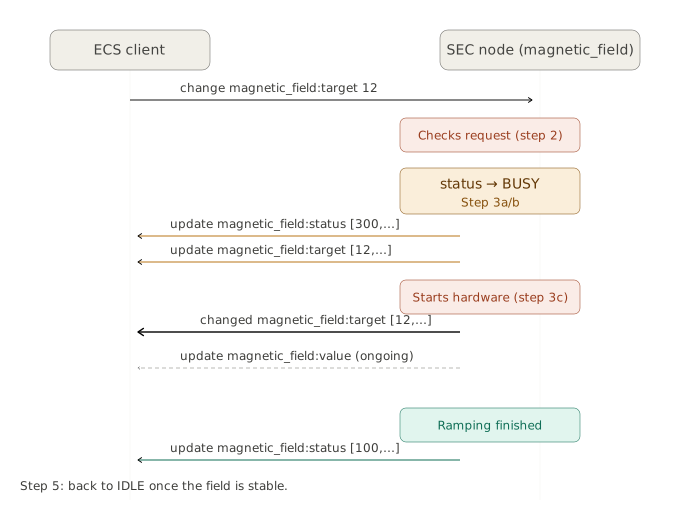
> read magnetic_field:status
< reply magnetic_field:status [[100,"OK"],{...}]

> change magnetic_field:target 12
< update magnetic_field:status [[300,"ramping field"],{...}]
< update magnetic_field:target [12,{...}]
< changed magnetic_field:target [12,{...}]
< update magnetic_field:value [0.01293,{...}]

  ... time passes, field keeps ramping, periodic value updates ...

< update magnetic_field:status [[100,"OK"],{...}]
Let’s connect this to the five steps above:
The first
read magnetic_field:statussimply confirms the module starts out IDLE (code 100).change magnetic_field:target 12is the initiating request (step 1).The SEC node validates the request, decides it cannot be completed instantly, and switches to BUSY – this is the
update magnetic_field:status
[[300,"ramping field"],...]
line (step 3). Note that this is an event, not a reply: it is pushed to the client, unsolicited, exactly as it would be pushed to any other connected client that had activated updates.The new target value is also a side effect of the change, so it too is announced via
update magnetic_field:target [12,...](still step 3 / step 4 preparation – this is the value being “stored”, not yet read back from hardware).Only now does the
changed magnetic_field:target [12,...]reply appear (step 4): the direct answer to the original request, sent after the related updates, exactly as the “side effects before reply” rule demands.While the field is ramping, the ECS keeps receiving
update
magnetic_field:value
events with the current field reading – this is what lets a GUI show a live progress display without polling.Eventually, once the field has reached 12 T and the magnet is settled, the SEC node announces the transition back to IDLE via a final
update magnetic_field:status [[100,"OK"],...](step 5). From this moment on,magnetic_field:valuecan be trusted to equal the target (within the device’s precision), and any newchangerequest can be processed without first waiting for a previous one to clear.
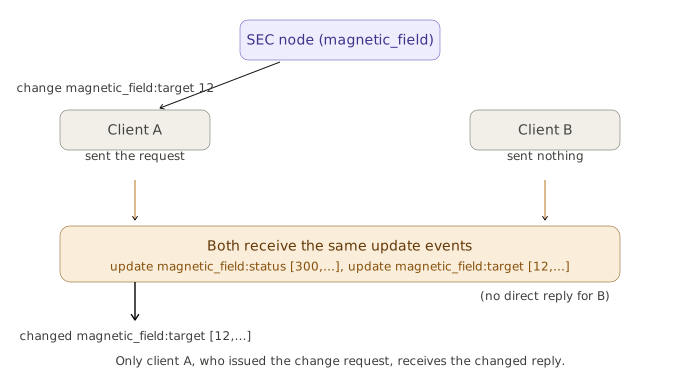
Two clients at once#
Because all clients with activated updates receive the same BUSY/IDLE transitions, a second client that did nothing at all still sees:
< update magnetic_field:status [[300,"ramping field"],{...}]
< update magnetic_field:target [12,{...}]
< update magnetic_field:value [0.01293,{...}]
...
< update magnetic_field:status [[100,"OK"],{...}]
This client never sent a change and never receives a changed
reply – it only ever receives the update stream. This is precisely
the “other clients would be left in the dark” problem mentioned earlier,
solved by always broadcasting status and value changes to every
activated client, regardless of who triggered them.
A second example: a quick, non-blocking command#
Not every do needs to go through BUSY. If an action genuinely
finishes within a communication round-trip, steps 2 and 3 collapse and
the SEC node can reply immediately:
> do temperature:stop
< done temperature:stop [null,{"t":1505396348.876}]
Here stop has no return value (null), and stopping the module
was fast enough that no BUSY phase was needed (in practice, stop
itself often causes a brief BUSY period while the hardware
decelerates – the point here is simply that the SEC node is the one
deciding, per action, whether a BUSY excursion is necessary).
A do command with both an argument and a return value looks the
same in structure:
> do temperature:setpid {"p": 100.0, "i": 5.0, "d": 1.2}
< done temperature:setpid [[42, "control active"], {"t": 123456789.2}]
A third example: when the request is rejected outright#
Step 2 of the busy sequence allows the SEC node to refuse a request before anything else happens. No BUSY transition, no update – just an immediate error reply:
> change temperature:target -9
< error_change temperature:target ["RangeError", "requested value (-9) is outside limits (0..300)", {}]
Other relevant error classes for this situation include IsBusy (the
module is already busy with a previous action and cannot accept a new
target yet) and ReadOnly (the parameter cannot be written to at
all). These are all persisting or retryable errors as classified by
the specification – IsBusy, for instance, is explicitly retryable:
the same request, sent again once the module has returned to IDLE, may
well succeed.
It is also possible for an error to occur after the module has already gone BUSY – for example, if writing the new setpoint into the hardware itself fails for communication reasons. The specification explicitly allows for this case: the status may already show BUSY, and the direct reply to the request can still be an error.
Why polling alone would not be enough#
A client that has not activated asynchronous updates can still
implement a correct busy sequence, just less efficiently: it sends
change, waits for changed/error_change, and then repeatedly
sends read magnetic_field:status until it sees IDLE again. This works, but it
illustrates exactly why the asynchronous update mechanism exists:
without it, “how is the ramp going?” can only be answered by hammering
the connection with read requests, and the other connected clients
would have absolutely no way of finding out that anything was happening
at all, unless they too kept polling continuously. The busy sequence’s
design – broadcast the BUSY/IDLE transition and the changing values via
events, and keep the direct reply for “I accepted/rejected your
specific request” – gives both efficiency and the ability for several
independent clients to stay synchronised.
Summary#
Reading a value or issuing most commands in SECoP is a plain request/reply exchange.
Writing a parameter (
change) or executing a command (do) that may take a noticeable amount of time follows the busy sequence: the SEC node first decides whether the request is even valid, then – if it requires real time – announces a transition toBUSYvia an asynchronousupdateevent to all activated clients, only then starts the hardware action, and only after that sends the directchanged/donereply.When the action eventually finishes, a further
updateevent announces the return toIDLE(or toWARN/ERROR), along with the final values of any parameters affected.The fixed ordering – side effects communicated before the direct reply – avoids race conditions for clients that maintain several simultaneous connections, and ensures that every connected client, not just the one that issued the request, learns about the module’s changing state.